Augmented Intelligence for Compliance and Equipment
Every rig.
One glance.
One system for the whole rig: permits, safety cards, certificates, inspections, maintenance, stores, procurement and budget. It runs on the rig with no signal, reads every record as it is written, and gives the operator a live, read-only view of every contractor rig.
- Spreadsheet registers
- Paper permit books
- A separate HSE card tool
- A separate maintenance app
- Stores ledgers
- Month-end report packs
- Email chains for spares
The problem
You find out
at the audit.
On most rigs, compliance lives in spreadsheets, binders and one person's memory. By the time it reaches the office or the operator it is weeks old and formatted differently by every contractor.
AiCE turns the working day into the record. The crew raises permits, writes cards and issues stock the way they do now. AiCE files, seals, counts and checks it as it happens.
Always audit-ready
No question about status. Ever.
Every certificate, inspection, regulatory item, training ticket, maintenance task and critical spare runs on one clock. Ninety days out is enough to mobilise a vendor; fourteen is not. AiCE warns at each step, then daily, and the Critical view puts everything due inside seven days or already overdue on one list.
When the auditor, the client rep or the office asks, the answer is already on the screen, with the document one click away.
Inside AiCE
Every function, one window.
Eighteen modules, laid out the way the app lays them out. Pick one to see what it does.
Overview
Dashboard & Critical
The rig's position on one screen, and only the things that need a decision today.
- Needs-attention stripRising stock draw, reorder exposure, unattributed issues, hazmat placement, CAP recurrence, card exceptions and escalation suggestions, each a count that opens what it counts.
- Critical viewEverything due inside seven days or already overdue, from certificates, regulatory items, maintenance and inspections, in one list.
- Reminder ladder: 90, 30, 14 days, then dailyFires once at each step, so nobody is flooded and nothing is missed.
- Grouped notification bellAlerts grouped by kind, never a wall of 99+, and every row takes you to the record.
- Rig selector on every screenSwitch rigs from one pill; every figure follows.
Overview
Inventory & stores
A stores system that knows what is running out before the shelf is empty, and which parts stop the rig if it is.
- Append-only movement ledgerThe count is built from what happened, so it cannot quietly drift.
- Critical spare identificationThe items whose absence stops operations, named and watched.
- Runway against lead timeDays of stock left beside the vendor's real lead time, with a requisition one click away.
- Rising draw detectionAn item used faster than its history predicts, flagged before it runs out.
- 13-month consumption and burn rateRebuilt from the ledger on every movement, with a corrected monthly divisor so reorder quantities are not understated.
- Reorder exposure and min/max correctionWhat is below minimum now, and which minimums are wrong because they keep being breached.
- Compatible parts poolWhat else fits, answered at 3 a.m. from the register, not from memory.
- Stock drift detector and deferred attributionFlags when ledger and shelf disagree; lets a rushed issue be linked to its work order afterwards.
- Locations, bins and hazmat placementWhere it actually is, and hazardous stock checked against the hazard class of where it sits.
- Waybill and manifest ingestA delivery note becomes stock without being retyped.
Overview
PDA scanner & labels
Issue, return and adjust stock in the store with a handheld scanner. No typing, no clipboard, no transcription errors.
- QR issue and returnSeconds per movement, with the work order attached at the scan.
- Easy count adjustScan the bin, tap plus or minus, pick a reason. The adjustment goes into the ledger with who and why.
- Works with no signalThe handheld queues movements in a container or a void space and syncs when it is back on the rig network.
- Thermal label printingPrints straight to the label printer. No driver, no print queue, no failed job.
- Paired devicesEach scanner is paired by its own key, so a lost device can be cut off in one step.
Overview
Certificates & inspections
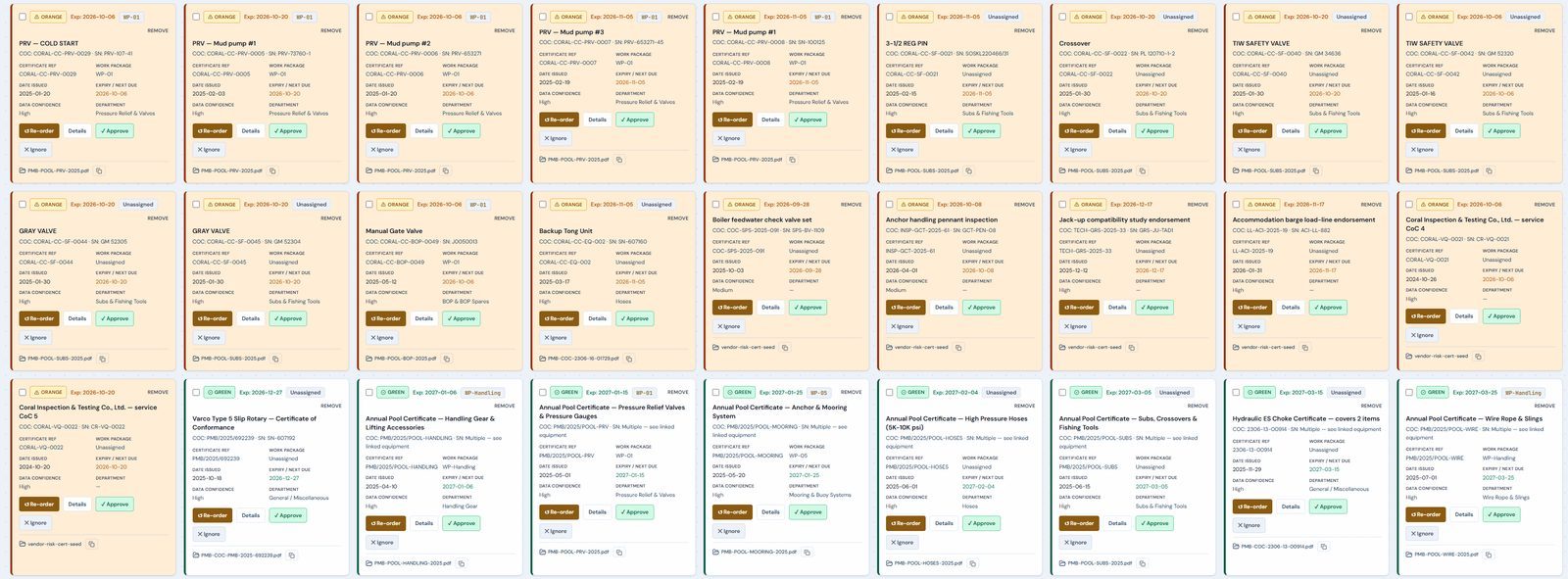
Every lifting item, pressure item and statutory requirement, with its certificate, its due date and its evidence.
- Asset-linked CoC registerOne certificate belongs to one asset, with its own dates and the document one click away.
- Document type discriminationA statement of fact cannot satisfy a requirement for a certificate of conformity.
- Inspection forecastThis week to next year, as a list or a calendar.
- Findings, notes and photographsWho inspected, when and what they found, attributed and timestamped, and on the export.
- Regulatory compliance registerClass surveys, third-party inspections and statutory certificates beside the equipment certificates.
- Serial conflict detectionOne serial on two records means one of them is not being maintained.
- Derived-date labellingA calculated expiry is marked as calculated, never passed off as read.
Overview
Equipment & in-service days
The asset register as it really sits on the rig, with the clocks your client asks for.
- Parent-child equipment registerComponents sit under the assembly they belong to, with serials, part numbers and locations.
- In-service day trackingService-time clocks for major drilling equipment, rig moves excluded.
- Running hours against the manufacturer's intervalHours since last overhaul, with total hours as a second counter.
- Change-out clocksA replaced unit counts from its own installation date.
- Coverage statementEvery report says how complete its inputs were.
- CPP and yard equipmentPlatform and yard items held separately from rig assets, with their own movement history.
Operations
Permit to work
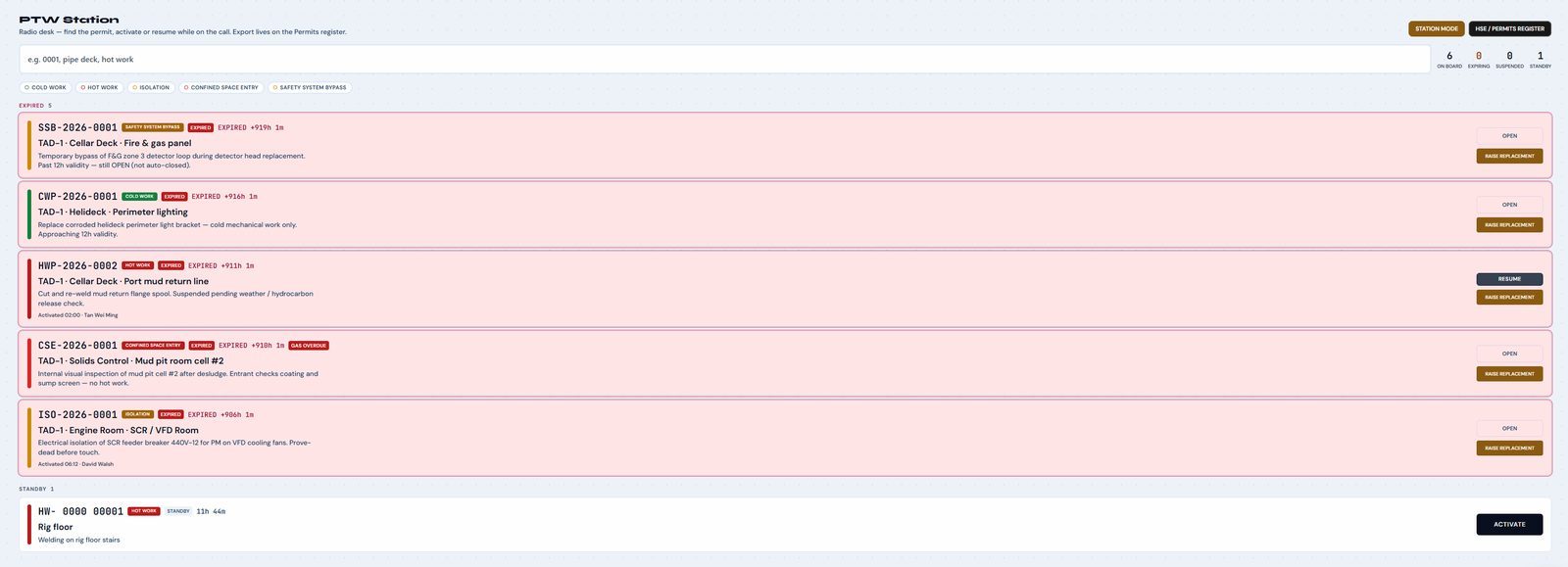
The permits the crew already knows, on screen and in print, with signatures that cannot be skipped, faked or quietly changed.
- Five permit formsHot work, cold work, isolation, confined space entry and safety system bypass, paper-faithful and bilingual.
- Signatures in order, by the right personSection-scoped pads, individual PINs and a signing order the system enforces.
- Gas tests captured and lockedReadings required before approval, locked to the verifier's signature.
- Isolation register per permitTag, method, key and lock number for every isolation point.
- The permit board and station modeFive urgency bands, twelve-hour validity enforced, one-press activation for the radio operator.
- Sign at the worksiteMobile signing over the rig network, with the same rules as the desk.
- Sealed on closeAn append-only signature chain and a keyed seal; any later change is detected and recorded.
- Archive by period, type and rigAny permit from last year in three clicks. Raise a replacement in a minute, fields carried, no signatures.
Operations
Maintenance & work packages
Planned and corrective work in the format the crew recognises, aligned with the office system.
- Work order registerPlanned and corrective, with the parts consumed on each order.
- Scheduling, 30 days to a yearA Gantt with the work order behind every bar, preventive generation and deferred work tracked.
- Photographic proof of completionAttributed and on the export.
- Part-to-assembly degradationGaskets replaced again and again means the flange is going.
- Work packagesScoped bundles of work with their own schedule, linked to the maintenance and permits they depend on.
- SAP PM alignmentThe planned-maintenance schedule from the office system sits beside the rig's own register.
Operations
Downtime
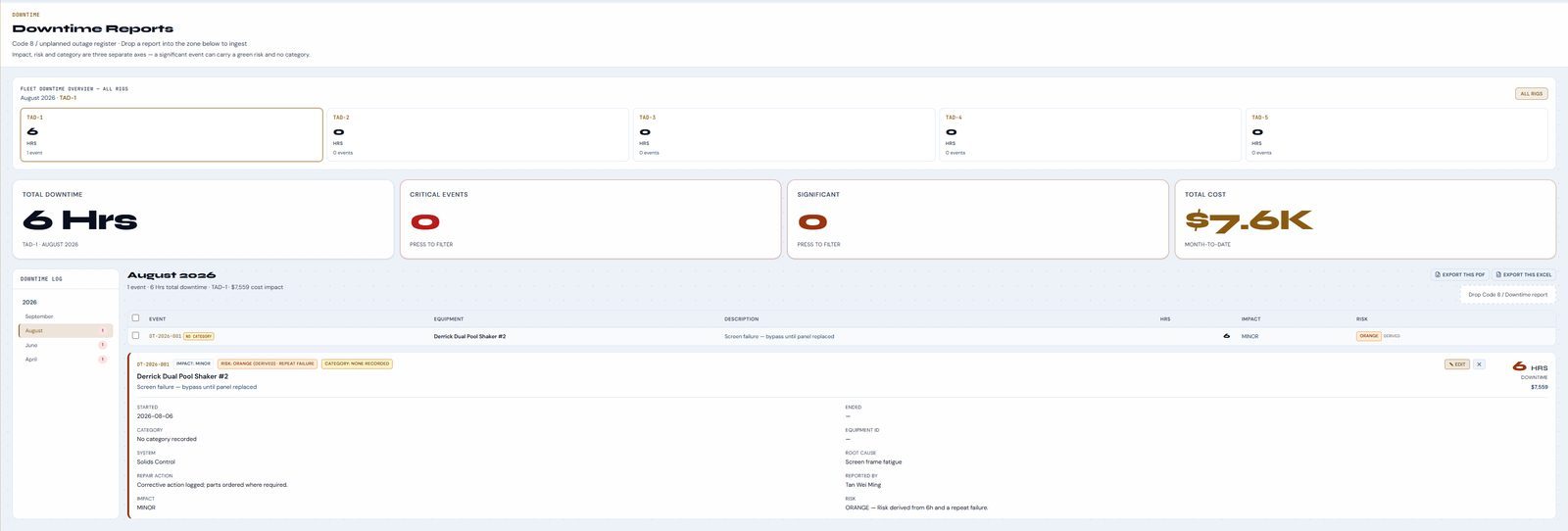
Every lost hour with its cause, its equipment and its cost, so repeat failures show as a pattern instead of bad days.
- Structured captureCategory, failure mode, planned or unplanned, impact and accountability.
- Equipment-taggedThe same pump failing three times appears as one pattern.
- Cost impact per eventDowntime with a number attached to it, month to date.
- Operational periodsA rig move does not read as a collapse in activity.
- Drop in a downtime reportThe report is read and the event filled in for checking.
- Fleet overviewHours and events by rig on one strip.
Operations
Document ingest
Drop a certificate pack, a waybill or a spreadsheet anywhere in the app. AiCE reads it on the rig and shows you what it will save before it saves it.
- Drag and drop, anywhereNobody has to know which screen takes which file.
- Offline OCR, full documentA forty-page databook is read to page forty, on the rig, with no internet.
- Pack segmentation and document typingFive documents in one PDF become one record plus attachments; a CoC is told apart from a test or material certificate.
- Field provenance and confidenceEvery value shows whether it was read, matched or derived, and a poor scan does not look like clean text.
- Disagreements shown, not hiddenTwo serials in one pack are both put in front of you.
- Staging review before saveNothing is written until a person has seen it.
- Spreadsheets, Word files and phone photosExisting registers and JSAs move across without being retyped.
Operations
Procurement
From a reorder recommendation to a purchase order on one board, with a named approver at every stage.
- Requisition to purchase orderOne board, named approvers, the full approval trail.
- Raised from the recommendationA part running short becomes a requisition while there is still time to ship it normally.
- Pending queueRequisitions, material requests and orders waiting on someone, by name.
- Single-source exposureThe number that predicts the emergency freight bill.
- Learned lead timesReal order history replaces the assumed lead time.
Recommended
Requisition
Approval
Ordered
Safety
HSE & safety cards
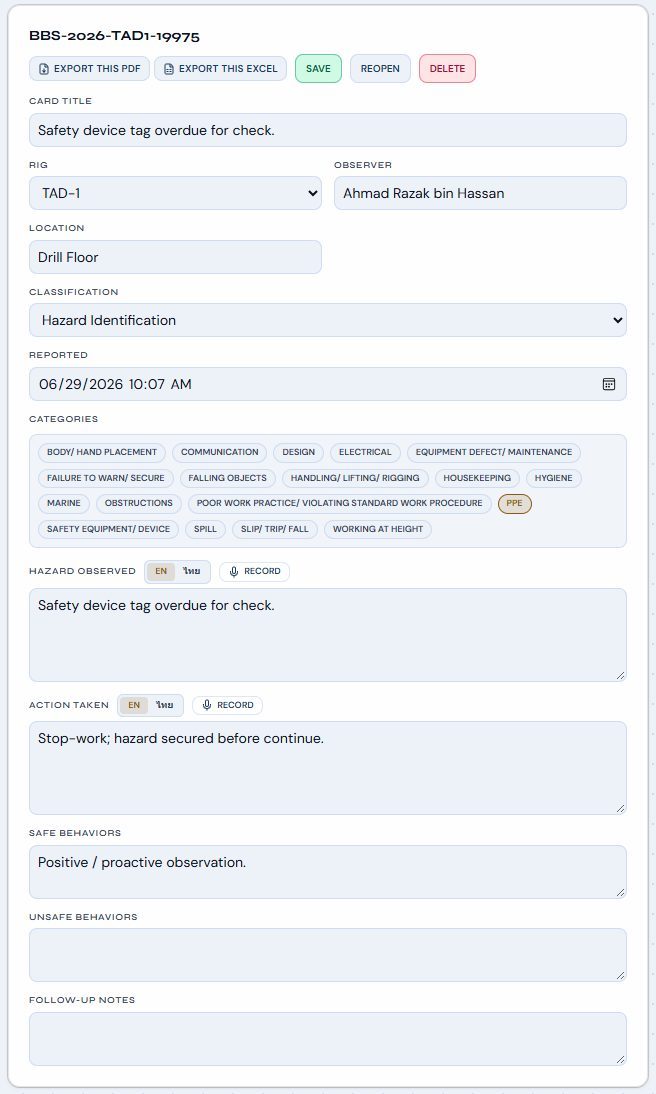
Built for a crew that writes fifteen or more cards a day, and a supervisor who has ten minutes to read them.
- Observation cards, spoken or typedRecord the hazard and the action in Thai or English; the card fills itself in.
- Exception boardThe four cards a supervisor will act on, not two hundred nobody reads.
- Incidents and near missesLinked to the equipment and the permit involved.
- Dropped objects and DROPSTied to the same exception logic.
- Archive by period and categorySafe or at-risk, searchable by observer or area.
- Immutable once submittedA correction is a new card, so the record stays honest.
Safety
AI Safety
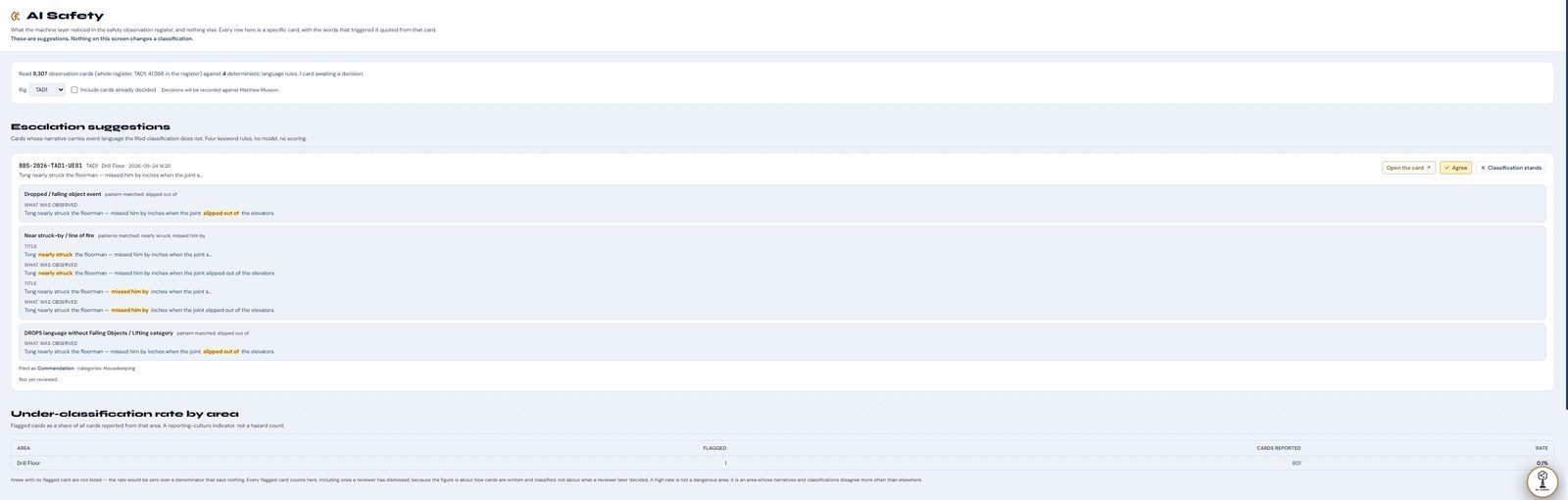
Reads every card the crew writes and finds the one that sounds worse than it was filed. It suggests; a person decides.
- Escalation suggestionsA near miss filed as a commendation is pulled out, with the exact words that triggered it quoted from the card.
- Under-classification rate by areaA reporting-culture signal: where cards are written softer than what they describe.
- Clusters forming on one deckThe trend shows before it becomes an incident.
- Agree or let it standEvery decision is recorded against a named person.
- Explainable, on the rigEvery suggestion shows its reasons. Nothing is sent to the internet.
Safety
STAR, CAP & training
Safety statistics computed from records, corrective actions an auditor can trust, and nobody arriving offshore on a lapsed ticket.
- STAR safety statisticsLTI-free days, permit counts and JSA activity, computed from the records rather than typed in.
- Corrective action programmeStanding and event-driven actions with owners, criticality and due dates.
- Gapless CAP numberingNo number skipped, reused or quietly withdrawn. Auditors check this.
- Recurrence and reschedule historyThe same action three times a year is flagged; every due-date change keeps its history.
- Photographic proof of close-outEvidence the work was done, attributed, and on the export.
- Training matrix and ticket expiryWho holds what, and what expires inside sixty days, with reminders before crew change.
- Fleet CAP roll-upEvery rig's open actions in one view.
Safety
JSA & SWI library
Controlled documents the crew actually uses, with the version that was in force on any given day.
- Library by departmentIn the paper layout the crew reads.
- Full revision historyThe complete prior version, not a note saying it changed.
- Version in force on the dayWhich revision applied on the day of an incident, answered in seconds.
- Printed sign-off sheet and print trackingThe crew signs at the toolbox talk, and each print is tied to the permit it supports.
- Review-by datesA JSA is reviewed on schedule instead of expiring silently.
- Word importAn existing library moves across without being retyped.
Management
Budget
Where the rig's money stands mid-month, while it can still be acted on.
- Allocations by department and categoryOperating, projects and contingency tracked separately.
- Monthly spend against allocationCommitted, pending payment and remaining, visible as approvals happen.
- Financial-year utilisationAn overrun visible in month four, not month eleven.
Management
Vendors
Supplier performance measured from what actually arrived, with honest sample sizes.
- On-time delivery per vendorMeasured from authorisation to receipt, with the sample size shown.
- Evidence tieringTwo deliveries is "insufficient history", never a percentage.
- Certificate quality by vendorComputed from the paperwork that actually came with the goods.
- Single-source exposure and spend concentrationA dependency visible before it becomes a bad negotiation.
- Scorecard and comparison viewsBubble and treemap views of risk against spend.
Management
Reports & analytics
Client-ready reports straight from the record, and trends that open the rows behind them.
- Executive positionCompliance, safety, maintenance and stores on one report.
- PDF and Excel, brandedTwenty-five exportable views, with provenance printed, ready to hand to a surveyor.
- Coverage stated on every reportA dash means not recorded, never a zero pretending.
- Trend analyticsConsumption, downtime, CAP recurrence, reorder exposure and compliance, each opening its records.
Fleet
Operator window
For the oil company: every contractor rig that runs AiCE, side by side, read-only, with nothing to host or administer.
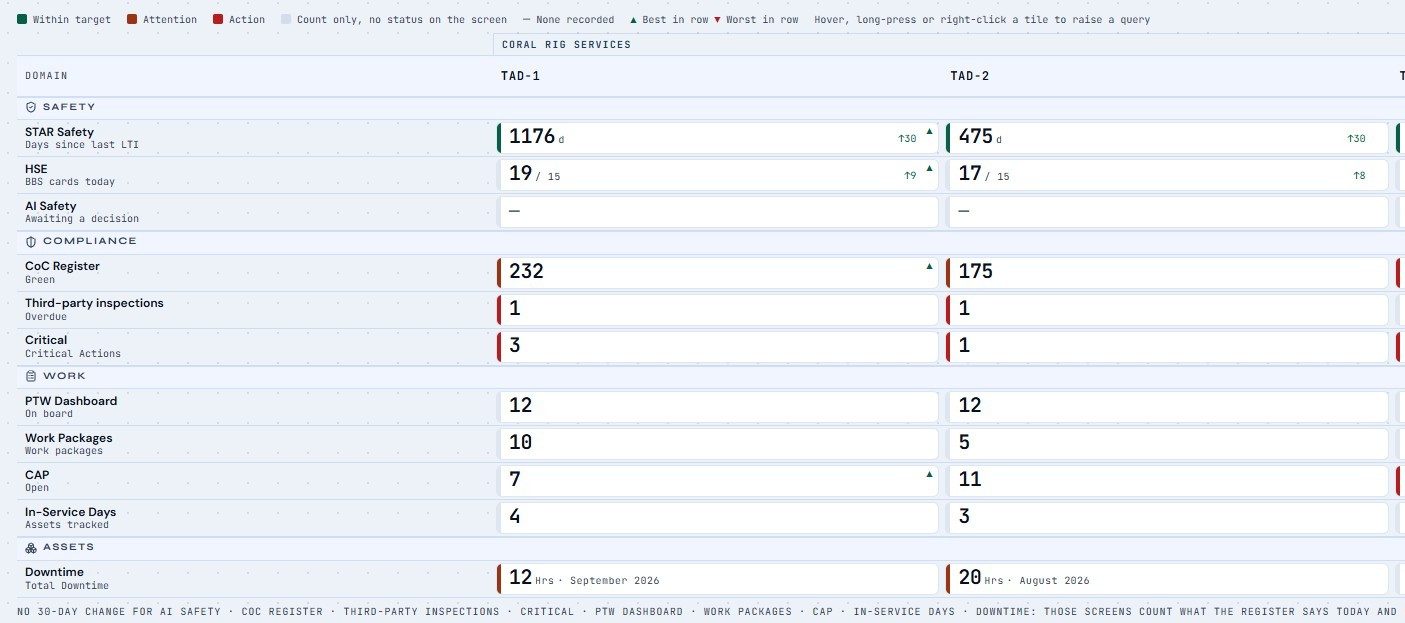
- Fleet ScorecardRigs by safety, compliance, work and downtime, best and worst marked in every row, with the 30-day change.
- Compare by rig or contractorOne click to group the fleet by contractor.
- Zoom into any tileStraight to that rig's permits, cards, certificates or inspections: the record, not a summary.
- Raise a query from a figureIt lands on the rig, on the record, dated, and the answer comes back on the same record.
- Client rep signatureThe one thing the window can sign: its own line on a permit, with an individual PIN.
- What it never showsPersonnel names, medical dates, prices, stock, purchase orders, budgets or vendors.
Screens and figures show a demonstration fleet with fictional rigs, crew and vendors.
Legacy reporting, retired
The month-end report is already written.
Most of a rig's reporting is retyping what already happened. AiCE captures it once, at the point of work, so the report is a button, not a week.
Linked to the fleet
Surplus on one rig. Shortage on another. Not any more.
Every rig's stores, critical spares and lead times in one fleet view. Before anyone pays for an emergency air freight, AiCE checks whether a sister rig already has the part on the shelf.
Mud pump liner 6½″. Five more than this rig needs.
Runway four days. Vendor lead time twenty-one days.
Holding to minimum. Nothing to do.
Fleet-wide part search
"Does anyone have this?" becomes a query instead of a chat thread at 3 a.m.
Critical spares, fleet-wide
Every part whose absence stops a rig, watched across the fleet against real lead times.
Value grows with every rig
One rig gives you a maintenance and stores system. Five rigs give you the consumption and failure history that makes planning ahead possible.
Augmented intelligence
AI that reads every record, and shows its working.
The "Ai" in AiCE is augmented, not automatic. It reads what the crew writes and what the stores record, and puts the few things that matter in front of a person, with the reasons.
AiCE Silhouette
Three screens where the work happens.
One machine holds the record. Tablets on the rig's own network put it where decisions are made.
The client rep's desk
The operator window open all shift: live permits, cards as they are filed, the JSA behind each job. Signs the client line on a permit with a PIN. Changes nothing else.
The radio room
The permit station on the desk that already controls the work. In a drill, the live permit map shows every active job, its work party and its isolations before the muster count does.
The smoking shelter
A voice card kiosk where the crew already talks. Say what you saw in Thai or English and the card writes itself. Speech is recognised on the tablet; no recording is kept.
Built for offshore
Works at 3 a.m. with no signal.
Offline-first
Everything runs on the rig's own machine. Nothing waits on a satellite link.
One host, every workstation
Every office reaches it through a browser. Nothing to install per seat.
Installed in a day
A Windows machine on the rig network, a label printer and a UPS. Your registers from day one.
No inbound connection
Nothing listens from outside the rig, so the IT conversation is short. Encrypted on the rig network.
Individual sign-in
Permits, hazmat and admin need a named person. PINs are hashed and lock out after failed attempts.
Sealed records
A closed permit or submitted card is sealed with a key that never leaves the host machine.
Full audit trail
Who did what, and when, on every record that matters.
Your language
Thai and English throughout, with Chinese and Arabic interfaces. Safety wording is reviewed by a person.
Backup as a folder
One copy captures the database and its identity. Rig-local time on every date.
Department scoping
Each department sees what it needs, not everything.
Nothing phones home
No telemetry and no automatic updates. The rig's data goes only where you send it.
White-labelled
Runs under the contractor's own name and branding.
Founder
Built offshore, by an OIM. Nothing was designed in an office and sent to the rig.
 Matthew MussonFounder, Slaive Technology Group · 25 years in oil and gas
- OIM licence · Republic of Panama
- IWCF Level 4 Supervisor, Surface
- OPITO OIM Controlling Emergencies
- 2022 – NOWOffshore Installation ManagerTender-assist rig, Gulf of Thailand
- 2018 – 2022Senior Drilling SupervisorSaudi Aramco · exploration wells, HPHT sour gas
- 2013 – 2018Drilling operationsCenovus / Husky Energy, Canada
- 2008 – 2013Rig ManagerPrecision Drilling, USA · including Houston new-builds
- 2001 – 2008DrillerPrecision Drilling, Canada
Getting started
Start with one rig.
Install in a day
Hardware, set-up and on-site training on your rig. Your existing spreadsheets imported, so the registers are yours from the first week.
Pilot on your own data
A short pilot to get the install and the data right, with the founder on hand to tune it to how your rig runs.
License per rig
Annual, per installation, under your own name. Add rigs as you go; the operator's window comes with it.
Contact
See it on a real screen.
A 30-minute demo walks through a working rig day, the stores and the operator's view of the fleet. For drilling contractors, operators and investors.