Augmented Intelligence for Compliance and Equipment
One system on the rig. No signal needed. Nothing retyped.
One system for the whole rig: permits, safety cards, certificates, inspections, maintenance, stores, procurement and budget. It runs on the rig with no signal, reads every record as it is written, and gives the operator a live, read-only view of each rig it runs on.
Runs offlineOne recordThai and English in the appInstalled in a day; usable from the first hour; registers filled over the first weekWhite-labelled for your company
Ninety seconds
Watch a rig day run on AiCE.
A waybill read in, a hot work permit signed, a safety card sealed, the AI flagging what was filed too softly, and the view from the operator and the office. All in ninety seconds.
AiCE Field Logistics · demonstration build1:27
Want the full walkthrough?Seven and a half minutes, every screen, narrated: stores, maintenance, certificates, permits, safety, the scorecard and the corporate view. We will email you the link.
Thank you. The full walkthrough is on its way to your inbox.
Demonstration build. Every rig, company and person on screen is fictional.
Three ways in
One record. Which chair are you in?
AiCE is one system on the rig. What it does for you depends on whether you run the rig, oversee it for the operator, or run the company.
Drop the waybill. The stores do the rest.
The supply boat is alongside and the paperwork is a PDF, a photo or a spreadsheet. Drop it on AiCE and it is read on the rig, with no signal.
It reads itself. Every line on the waybill, with where each value came from.
Lines match existing stock. Known items land on their own catalogue lines; anything new is staged for a person to confirm.
Hazardous material is flagged at the door, with the storage location it belongs in, checked against the hazard class of where it is about to go.
A person commits. The ledger moves, and the ledger is the count.
Illustration of the receive screenFictional waybill
Not a report. A window.
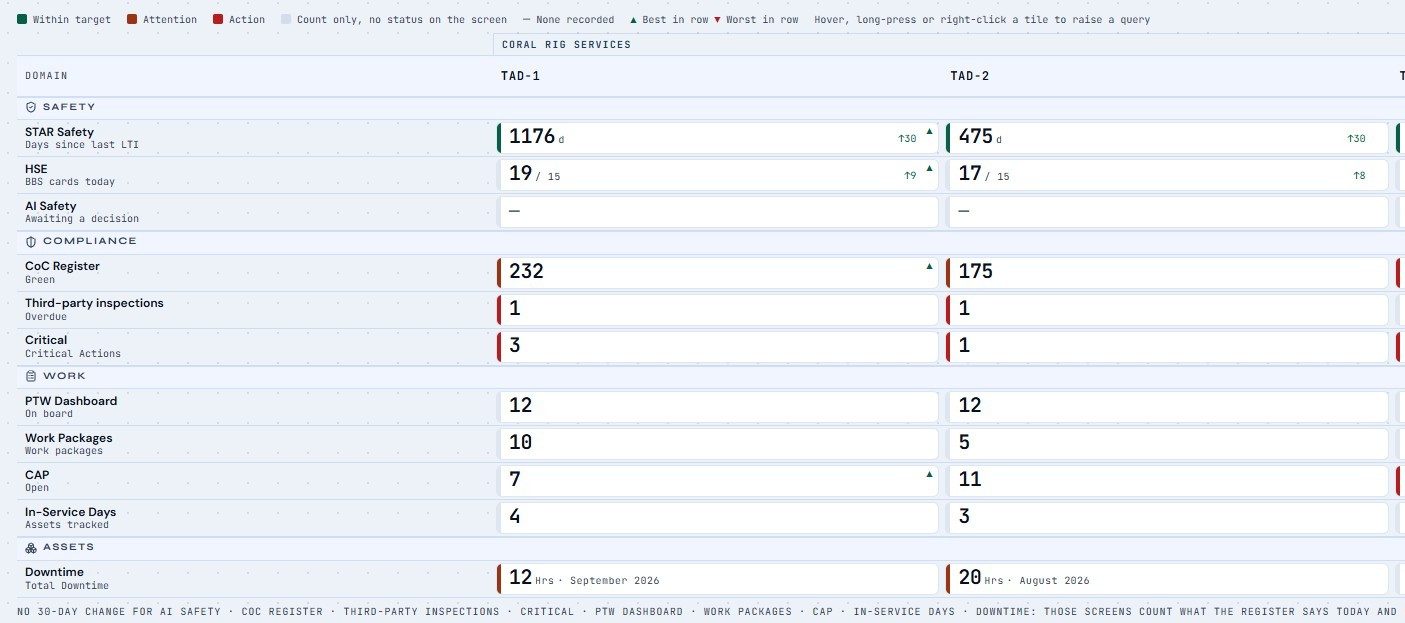
A report says what happened. A window shows how the rig works. A monthly HSE report is written by the contractor, after the fact, for the operator. AiCE is the system the crew runs the rig on: the permits they raise, the cards they write, the certificates they renew, the actions they close. The operator window reads that system directly, on each rig it runs on. Nothing is compiled, summarised or retyped for you.
On a Silhouette tablet in the DSV's office, all shift, under the operator's own sign-in.
It cannot be lateToday's board is today's. The window reads the rig's live record, not a month-end compilation of it.
It cannot be dressed upA dash means not recorded, never a zero pretending. Sealed records cannot be quietly edited.
It cannot hide the trendBest and worst in each row are marked. A rig drifting the wrong way shows it before the audit does.
Fleet Scorecard · best ▲ and worst ▼ in every rowDemonstration fleet · fictional rigs
Four questions. Then you close it.
One screen for whoever runs the company, read in thirty seconds. Are we spending to plan? Are we losing time? Is anyone getting hurt? Is anything about to stop the rig?
One word per rig. Clear, Caution or Action, with the reasons beside it.
Since yesterday. What changed, each line from a dated record.
Last entry. When each rig last wrote anything, so a quiet rig and a silent one never look the same.
No person is named and nothing on it can be edited.
The dashboard shows every rig the host holds. On a one-rig installation that is one rig, full width, no rig pill. Fleet-wide figures across separate rigs arrive with the fleet link.
StandingClearNothing red or amber
Money
Are we spending to plan?
Spend to plan
Spend this month
Time
Are we losing time?
Downtime
Downtime cost
People
Is anyone getting hurt?
Days since LTI
At-risk share
Stop the rig
Is anything about to stop it?
Certificates expired
Critical spares out
Since yesterdayEach change from a dated record
Last entryWhen the rig last wrote anything
Illustration of the corporate dashboard · figures left outOne-rig layout
Receiving a waybill
Two to three days by hand. About a minute in AiCE.
On the rig where AiCE was built, the storeman takes roughly two to three days to fully receive a waybill once it is on board. Every line typed, every item checked against the shelf, every hazardous drum walked to the right locker. In AiCE, the same waybill is dropped, read, matched and committed in about a minute.
By handRoughly 2 to 3 days
Day 1Day 2Day 3
Type each line into the register
Check each item against stock
Look up the hazard class and the locker
File the paper, chase the differences
With AiCEAbout 1 minute
Drop the waybill
Lines read and matched to stock
Hazmat flagged with its locker
A person commits; the ledger is the count
Not just waybills. Every document drops in.
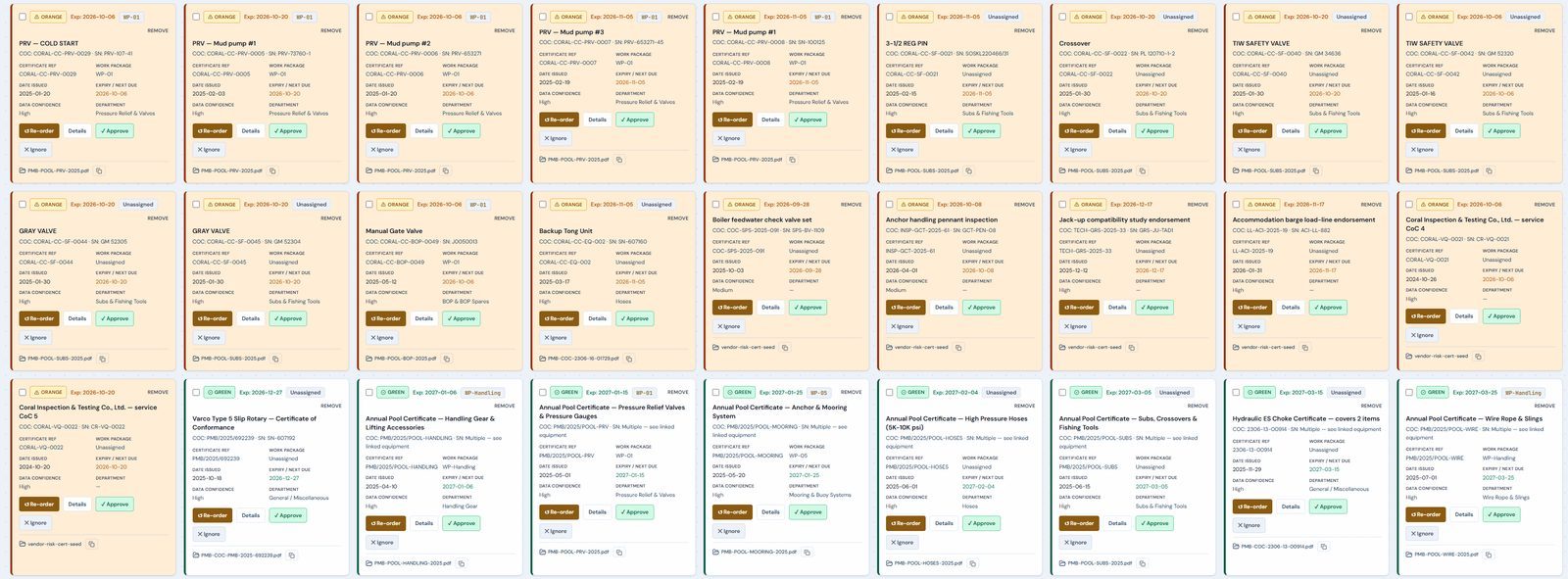
Word, Excel, PDF, JPEG and PNG, dropped anywhere in the app and read on the rig with no signal. AiCE shows where every value came from, and a person approves before anything is saved. Nothing is retyped.
Waybillsbecome stock received, matched line by line
Certificate packsbecome register entries, filed as certificates even when the file name looks like an order
Safety data sheetsbecome hazmat records with their storage class
Spreadsheetsbecome work orders, purchase requests and purchase orders
Existing registersmove across at install instead of being typed in
JSAscome across from Word and Excel without retyping
DOCXXLSXPDFJPEGPNG
Fleet Balance
Borrow from the sister rig before you buy.
Every rig sees what every other rig is holding. A surplus on one rig and a shortage on the next is a transfer on the supply boat that is already coming, not an emergency order with air freight on top. Stores, critical spares and lead times, per rig and across the fleet.
TAD-1Surplus
9on hand · min 4
Mud pump liner 6½″. Five more than this rig needs.
TAD-4Shortage
1on hand · min 4
Runway four days. Vendor lead time twenty-one days.
TAD-2Covered
5on hand · min 4
Holding to minimum. Nothing to do.
Move 3 liners from TAD-1 to TAD-4 on the next supply boat.No emergency order, no idle stock, and both rigs back above minimum.
With the fleet link
Per rig today. Across rigs with the fleet link, which syncs the rigs and the office. How the fleet view works
One day, one rig
A shift on AiCE.
The crew does the same work it did yesterday. The difference is what happens to the record afterwards. Pick an hour.
TAD-1 · 05:45Rig host
The business case
Where it pays for itself.
Every function on this page saves time. These are the ones that save money, and most of them start on the day the rig goes live.
01From day one
Stores that cannot be miscounted
Every movement is scanned or read in, never typed twice. The count is built from the ledger, so the number on screen is what actually happened, and the human error that turns into a stocktake surprise, a double order or an emergency freight bill is gone. The saving starts the first week, before anyone has changed how they work.
02From day one
Drop it in. It reads itself.
Word, Excel, PDF, JPEG and PNG, dropped anywhere in the app. Waybills become stock, certificate packs become register entries, spreadsheets become work orders, purchase requests and purchase orders. AiCE reads them on the rig, shows where every value came from, and a person approves before anything is saved. The hours spent retyping into legacy files disappear.
03From day one
Hazmat flagged at the door
When hazardous material is received it is flagged for the storeman and checked against the hazard class of where it is about to be put. The chemical that should never have shared a locker never does. One avoided incident pays for the system many times over.
04From day one
The standards are in the register
Every item in the certificate register is tied to the standard that governs it, from the hoisting load path and the derrick to cranes, wire rope, drill stem, well control, lifting gear, containers and life-saving appliances. The standard sets the category and the evidence a certificate needs; your class, flag and the operator's bridging document set the interval. Every interval in AiCE is a labelled policy default, never a number the app invented, so the auditor sees exactly where it came from.
Inspections due, tickets expiring and maintenance missed stop being surprises: every one is on the Critical list before it is overdue. Each downtime event, incident and corrective action is captured when it happens, with its cause, equipment and cost, by the person who was there. The monthly report is computed from those records. Nothing is rebuilt from the daily reports, and nothing is lost between the rig and the office.
Want the numbers for your rigs? Put your figures in the calculator, or bring your stores and vendor data to the demo and we will run it on your rig.
One machine holds the record. Three Android tablets put it where decisions are made: a small AiCE Silhouette app that opens the host's screens over the rig network; nothing is stored on the tablet.
Tablet 1DSV office
The DSV's office
The operator window as it is, open all shift: live permits, cards as they are filed, the JSAs and the day's compliance. The client rep signs the Client Representative line with an individual PIN and raises queries. Changes nothing.
Tablet 2Radio room
The radio room
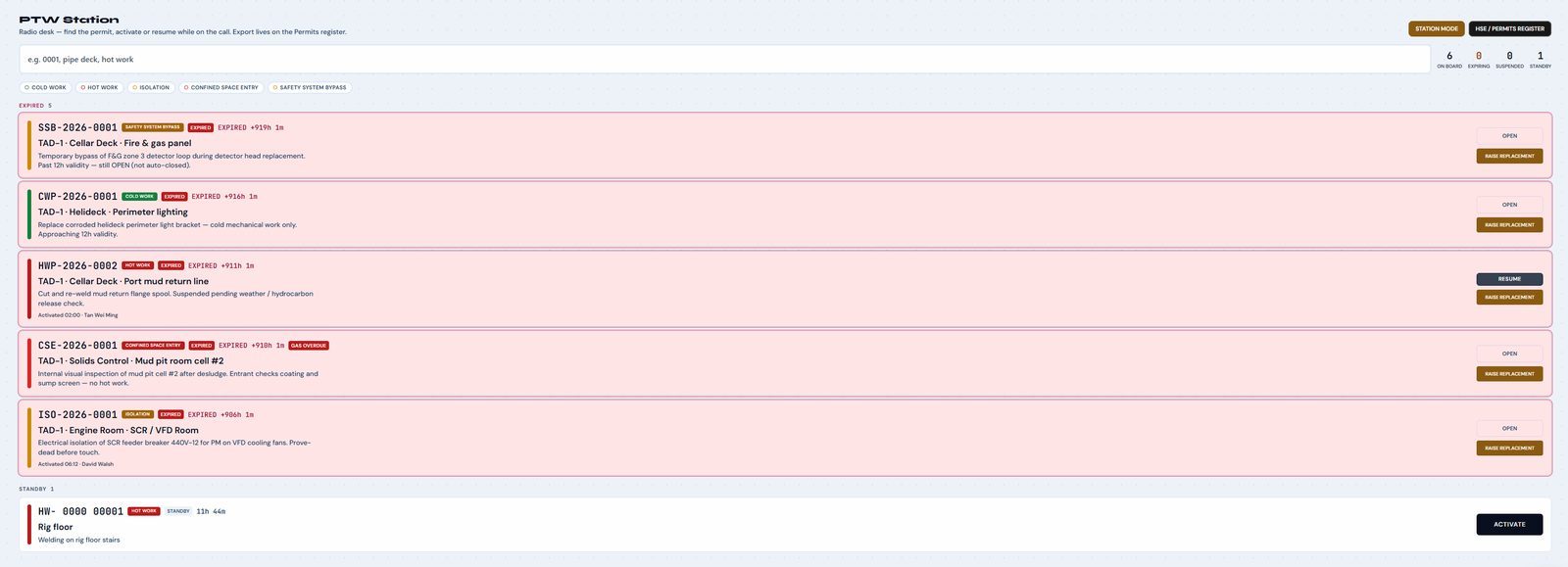
The permit station, and in a drill the live permit map: every active permit drawn in its zone on the rig's general arrangement, with its work party. One control, Muster, shows the people under permit by zone with a timestamp and prints a one-page sheet for the muster checker. No PIN, because seconds matter. It shows permits and their parties, never a person's position.
Tablet 3Smoking area
The common smoking area
A stand-alone voice card kiosk: one large Speak your card button and nothing else reachable. The card is shown back to correct by voice or touch before it is filed, and anything not said is marked not stated, never guessed. English now, Thai after review. Speech is recognised on the host, not the tablet; the clip stays with the card and is deleted with it.
Try it yourself
Sign a permit. Clear the Critical list. Issue a part.
Three working pieces of AiCE on a demonstration rig. Click, sign, filter and issue. Nothing you do here is saved, and every name and figure is fictional.
AiCE Field Logistics · Coral Rig Services · TAD-1TAD-1 ▾Demonstration
Permit board · today
Pick the draft permit and sign it through. Try signing out of order.
Critical · next 7 days and overdue
Open a row to see when each reminder fired, the vendor lead time, and what to do next.
PDA · issue from stores
PDA · scanner
Mud pump liner 6½″CRS-MP-0614 · Bin D-07 · Drilling equipment
−1+
Issue to jobReturnAdjustTransfer
Mud pump liner 6½″CRS-MP-0614 · TAD-1 · minimum 4 · vendor lead time 21 days
Covered
9on handrunway 36 days at recent draw
The ledger is the count. Every movement below changes the number above; nobody retypes it.
TimeMovementQtyBy
06:40Issue to job · WO-2026-0311−1S. Prasert
YesterdayReceipt · PO-2026-0287+4N. Wattana
MonIssue to job · WO-2026-0302−2S. Prasert
Issue six and watch it drop below minimum.
Signing order, seals and minimums behave as they do in the appDemonstration fleet · fictional rigs and people
For rig IT, the DPO and the auditor
Your record stays on your rig.
The questions IT and data-protection people ask before anyone signs, answered plainly. A technical note with the detail is available on request.
Where the data lives
Installed on one Windows machine on the rig, the designated host; browsers on the rig network reach it. Nothing is installed per seat and nothing is stored in a cloud.
Internet
None required. Nothing listens from outside the rig, nothing phones home, and there is no telemetry. The AI runs on the host; no record is sent to an outside service.
Who can do what
Named sign-in for permits, hazmat and admin, with PINs stored hashed and locked out after failed attempts. Each department sees its own screens. The operator's window is read-only by construction.
Records that cannot be quietly changed
A closed permit or a submitted card is sealed with a key that never leaves the host. Signatures form an append-only chain, and every record that matters carries who did what, and when.
One writer for stock
Stock has a single writer: the ledger. On-hand, consumption and runway are derived from movements, never typed over. Two copies of the record are never allowed to disagree about a count.
Backup and recovery
A backup is a folder: one copy captures the database and its identity, with rig-local time on every date. If the host fails, a documented recovery brings the record up on a replacement machine.
It is your record
The data belongs to the contractor whose rig writes it. It leaves the rig only as the reports and backups you choose to send, and the five standard reports export in the same format every month.
Voice, kept on the rig
Safety cards can be spoken or typed in English; Thai speech follows after review. The recording stays on the host with its card, and discarding a card deletes its recording.
Demonstration and live kept apart
The demonstration fleet is fictional and a build guard keeps real operational data out of it. What you see in a demo is never another contractor's rig.
Updates
No automatic updates. New versions are installed on the rig by agreement, never pushed, so a rig in the middle of a well is not surprised by a change.
Need the detail for a security review? Ask for the technical note, or put your IT lead on the demo call.
No crash course and no install-and-leave. A service technician comes to the rig, puts your data in, trains every department and stays until your heads of department are comfortable running it.
Day one
Install
A Windows machine on the rig, a label printer and a UPS. Installed in a day and usable from the first hour.
One-time setup
Onboarding
Until your HODs are comfortable
The service technician trains each department on the rig and stays until the heads of department are comfortable with the system and your registers and spreadsheets have been applied and checked. Not a one-day crash course.
On board, not online
Go-live
Configured and branded as yours
Once onboarded, AiCE is configured to how your rig runs and carries your company's name and branding. Licensed per rig, per year; the operator's read-only window comes with it.
Annual, per rig
If the rig stacks
The licence pauses
A rig that goes off contract pays nothing until it restarts. The record stays on the host, the backup stays in your folder, and the clock resumes when the rig does.
Paused, not lost
White label, any industry
Built on drilling rigs. Not only for drilling.
Underneath, AiCE is five things tied to equipment and people. Any operation with a high-turnover store, a permit book and an auditor at the door runs on the same five, from offshore production and wind to mining, ports and utilities. Each company gets its own instance, configured and branded as theirs.
Certificateswhat must be in date, and when it lapses
Inspectionswho checks it, how often, with what lead time
Spareswhat stops the operation if it is not on the shelf
Observationswhat the crew saw, in their own words
Founder
Built offshore, by an OIM. Nothing was designed in an office and sent to the rig.
Matthew MussonFounder, Slaive Technology Group · 25 years in oil and gas
EducationMBA, University of BradfordDistance learning, completing 2027. Postgraduate Certificate stage achieved with Distinction. The MBA Management Project is a study of AiCE.
Licences and ticketsOffshore command and well control
OIM licence · Republic of Panama
IWCF Level 4 Supervisor, Surface
OPITO OIM Controlling Emergencies
2022 – NOWOffshore Installation ManagerTender-assist rig, Gulf of Thailand
2008 – 2013Rig ManagerPrecision Drilling, USA · including Houston new-builds
2001 – 2008DrillerPrecision Drilling, Canada
Book a demo
See it on a real screen.
A 30-minute demo walks through a working rig day, the stores and the operator's view of the fleet. For drilling contractors, operators and investors. Bring your IT lead if you like.